Synthesis & Sampling - “Learn from the Pros”
Synthesis
1. Components
Oscillators are the waveform that creates sound.
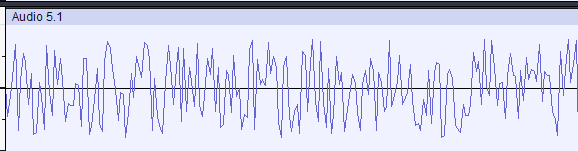
Wave Shapes:The greatest difference between oscillators is their wave shape. The smoothness of the wave determines the harshness of the sound produced
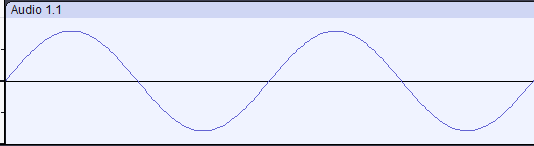
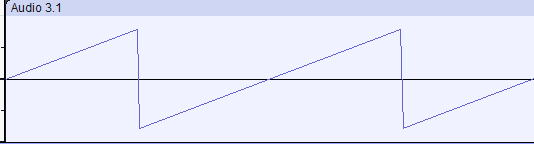
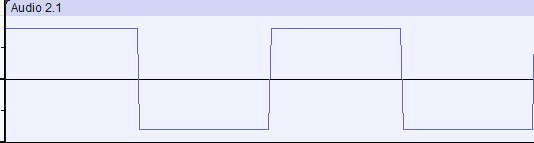
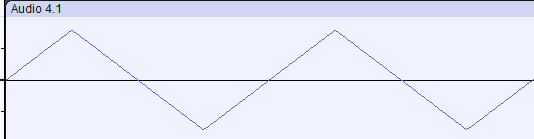
Low Frequency Oscillators, LFO:
Produce a constant, unheard tone (below human range of hearing) that can be used to modulate certain parameters. The benefit of using an LFO over an envelope is that an LFO is infinitely repeating whilst it has a frequency greater than 0Hz.
Parameters:
Filters
Filter out certain frequencies depending on where the cutoff frequency parameter is set. Different filter shapes provide different ranges.
Filter Shapes:Most commonly used are high pass and low pass filters. These remove frequencies below and above the cutoff point, respectively; this allows every other frequency to pass through and can be used to remove undesirable tones. Filters can be used to remove (or exclusively allow) frequencies within any determinant range.
Filter Types:In addition to its shape, the type of filter used affects the way it changes the sound; clean, OSR, MS2, SMP and PRD all have slight differences including the steepness of the filter's curve. All except clean allow drive to be used, adding distortion without using effects.
Envelopes
Envelopes modulate parameters over time.
Parameters:
2. Ableton Synthesisers
Analog
Synthesis Type | Subtractive:
A type of synthesis that starts with an VCO (oscillator), and then gradually ‘subtracts’ elements from the sound through components like Filters, Amp envelopes, and modulation. Subtractive synthsis is useful to create sounds that are simple and easy to adjust, without the complexity of other synthesis types.
Oscillator:
The sound generating source for the synth. This emulates the VCOs typically found on analogue subtractive synthesizers.
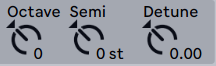
Octave: To create powerful, "stacked" sounds;
Semitones: To create "chord" sounds using specific intervals;
Cents: to slightly detune the oscillator, which can emulate the sound of real analogue synths, or create distressed sounds if turned up too much.
Filter:
Analog has two filters which can be applied in series or in parallel and can have different filter types. The Fil1 and Fil2 switches can be used to enable and disable either filter at will.

Envelope:
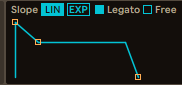
Analog has a basic ADSR (attack, decay, sustain, release) envelope design as discussed above, however it has seperate envelopes for each of its two filters.
Wavetable
Synthesis Type | Wavetable: A type of synthesis that starts with a VCO (oscillator), then adjusts its shape by changing its position on a wavetable. This type is useful for creating dynamic leads and other evolving sounds as moving through the wavetable can vastly change the sound produced.
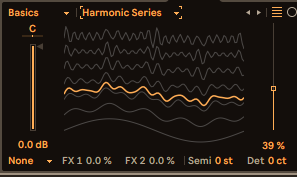
Modulating through the basic shapes using a wavetable:Wavetable:
Provides a set of wave shapes for the oscillator(s) to move through.
Matrix:
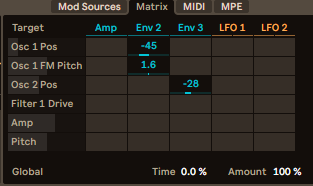
Allows for intuitive mapping of parameters to different modulators. Parameters to be modulated are selected on the left and appear when clicked on elsewhere in the menu. Mod sources are shown at the top.
There is also a MIDI matrix which modulates based on variables, such as velocity and key pressed, or at random.

Filter:
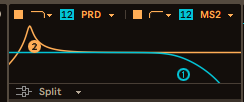
The wavetable filters can be routed into each other, in series or parallel, or filter 1 and 2 can be split and affect oscillator 1 and 2 respectively. Each filter can have a different type selected.
Voicing:
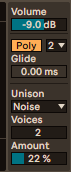
The wavetable synth can be polyphonic or monophonic. When poly, the number to the right controls the number of different sounds that the synth can produce at one time (i.e. the number of keys that can be pressed at once to produce sound).
Unison adds depth to the sound by producing slight variation using one of a number of algorithms.
When mono, glide can be utilised to smoothly transition between notes. The slider controls how many (m)s it takes to move from one note to the next
Operator
Synthesis Type | FM (Frequency Modulation): Routes different modulators(operators) into one another to create complex wave shapes with a wide range of harmonics.
Operators:
A set of four oscillators that modulate each other to produce a complex final wave.
Additional Synthesis Type | Additive: changes sound by adding harmonics above the fundamental note. Operator can be used as an additive synth by only using one operator with the wave shape set to 'User'. Additive synthesis can create a wide variety of unique sounds inaccessible to subtractive synthesis; often additive synthesis produces organ-like sounds.
Granulator III (External)
Synthesis Type | Granulative: manipulates an audio sample in different ways to create interesting sounds. Has certain crossovers with sampling techniques and is especially useful for droning ambience using the randomness of reversed grains or for layered textural sounds using a high density parameter.
Grain:
The section of audio that gets looped with each keypress.
Mode:
Granulator III has three modes which change how the grains play back.
Sampling
1. Fundamentals
In essence, sampling is taking a section of audio from one place and using it in another. This is perhaps most commonly done with drum breaks, in genres such as hip-hop; a famous example of a drum sample is the Amen Break, used in thousands of songs but originally from Amen Brother (YouTube) by The Winstons. The sample appears at 1:24. Another common use is vocal sampling. Sampling is a useful technique because it can lighten the creative load on the musician and/or provide things for the song that the musician is unable to create themselves.
2. Ableton Samplers
Simpler
Accepts a single sample and pitches it depending on the key pressed.
Mode:
Changes the manner in which the sample is played back when the key is pressed.
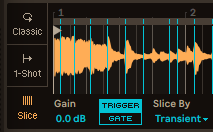
The audio can be sliced by: transient; the beat, best used when the audio is already aligned to the BPM of the project; region, dividing the audio into even slices; or manual, allowing the user to cut up the audio in specific places which is useful for obtaining short drum samples.

Filter:
Simpler has a basic filter with simple shapes and the standard types discussed above.


Digital Audio Considerations
1. Sample Rate
Analogue signals ae continuous; to digitalise such a signal requires the taking of a multitude of amplitude readings (samples). The samples can then be joined together to recreate the original signal. Sample rate is simple the number of samples taken per second and is measured in Hertz (Hz). A higher sample rate will provide a more accurate recreation of the original signal at the price of requiring more storage to store the extra data.
Nyquist Theorem
The Nyquist-Shannon sampling theorem states that to produce an accurate recreation of a signal, the sampling rate must be at least double the frequency of the signal at its greatest point. The standard minimum sampling rate for audio is 44.1 kHz.
2. Bit Depth
Bit depth is the accuracy to which a continuous analogue signal from an electric current is rounded, in order to be stored as a digital signal. A higher bit depth will be more accurate but will require more storage for the extra data.
3. Bit Rate
Bit rate is equal to the bit depth multiplied by the sample rate, measured in bps or more commonly kpbs. It provides a quick estimate of audio quality as one combinbed value.
For CDs, the standard is a bit depth of 16 and a sample rate of 44.1kHz. This produces a bit rate of 705.6kbps per stereo channel, of which there are generally two, giving a final value of 1,411kpbs. This provides a high level of fidelity
that well utilises the storage provided by such a physical medium; streaming services such as Spotify or YouTube have far lower bit rates. This is done to reduce the amount of data needing to be transferred when audio is requested,
cutting down on the time and money needed to stream it and store it. If you are creating a piece of music it may be a good idea to export multiple versions of your piece with different bit rates for these different purposes.